


Google Ads
4.13.48K Reviews
App Specs
- Version
- Varies with Device
- Updated On
- License
- Free
- Downloads
- 10,000,000+
- Developer
- Google LLC
- Categories
- Business
- Platform
- Android, iOS
Screenshots
 Analysis by AppCompare
I find the most useful way to think about Google Ads is as a mobile companion to campaign management, not a substitute for the focused work of building an advertising plan. Its value shows up when I need to check what is happening, understand a change, or make a considered adjustment while away from a desk. That distinction matters: the app can make campaign oversight more convenient, but a small screen and a live network connection shape what feels comfortable to do.
When a live connection matters
Campaign figures are only useful when I know what period and context I am looking at. On a phone, I would treat a quick dashboard glance as a prompt to investigate, rather than as a reason to react immediately. A sudden change in clicks, for example, may deserve a closer look at the date range and the campaign before I alter anything. This habit helps prevent a brief fluctuation from turning into a rushed decision.
Connectivity is central to that workflow. The app is designed to keep campaign information within reach, so checking performance or responding to an alert makes most sense when the phone has a dependable connection. If a page is slow to load or the figures do not appear promptly, I would avoid making a consequential change until I can review the account clearly. A mobile dashboard is convenient, but convenience is not the same as certainty.
Useful in the gaps between other work
I can see this being handy for a business owner who is moving between appointments, or for a marketer who wants to check an account during a commute break. A realistic routine might be to review campaign activity before opening a shop, notice that a particular campaign needs attention, and make a note to investigate it properly later. That is a better use of a short mobile session than trying to rebuild a full strategy while distracted.
The app is also a reasonable fit for someone who already understands the basics of their campaigns and wants a convenient way to keep an eye on them. If you are just starting out, the guided elements can make the first steps feel less intimidating, but I would still take time to learn what each setting does. The ability to reach a control quickly does not remove the need to understand its effect.
Small-screen decisions and safer habits
Mobile access can tempt me to make a change simply because I noticed something. I think it is wiser to separate monitoring from decision-making: use a quick check to spot a question, then make the change only when I have enough context. Before adjusting a campaign, I would confirm that I am looking at the intended account and campaign, and reread the setting before saving. Those few seconds matter when several campaigns have similar names.
Alerts can help draw attention to a budget concern, but I would treat them as a nudge to review spending rather than a complete explanation of performance. Budget limits and campaign results are related, yet they answer different questions: one concerns how much is being spent, while the other concerns what that spend is achieving. Keeping those checks separate makes the mobile view more useful and reduces the chance of confusing a spending signal with a performance verdict.
Worth Reading Before You Choose

Flipboard Shows What News Apps Must Do Beyond the Feed

Switching to Android Auto Means Rethinking Your Driving Routine

Google Calendar Makes a Crowded Week Easier to Manage

Ludo King Makes the Most of the Minutes Between Plans

Baby Panda World Brings Quick Play to Modern Phones, but Its Game Library Feels Busy

ESPN’s Live Game View Makes Following Close Games Easier
First Impressions: Navigating the Interface
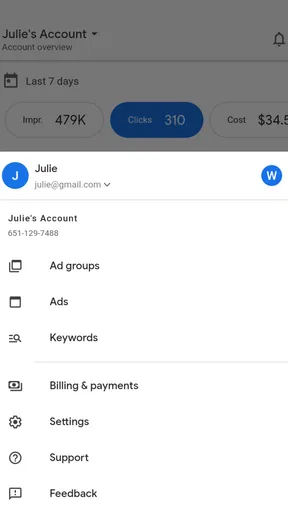
When I first opened Google Ads, I was instantly greeted with a clean and intuitive interface. The layout is super user-friendly, which is a big plus if you're like me and don't want to spend ages figuring things out. Everything is laid out in a way that makes creating and managing campaigns a breeze.
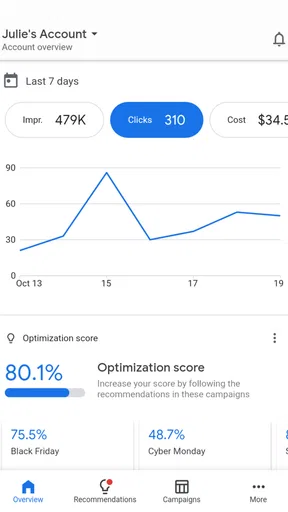
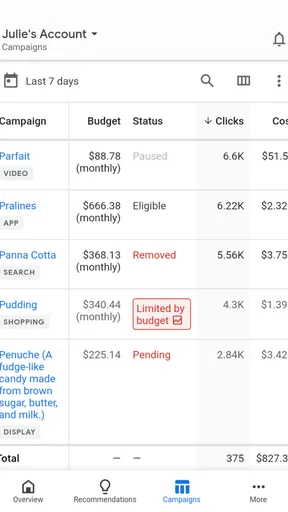
The dashboard is where all the magic happens. It gives you a snapshot of your current campaigns, key metrics, and insights into how your ads are performing. If you're a bit of a control freak (guilty!), you'll appreciate how easy it is to track everything in one place.
Creating Campaigns: Simplicity Meets Strategy
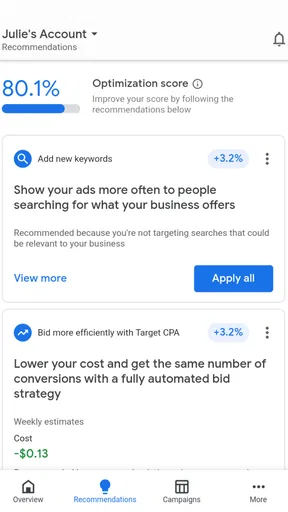
Now, onto the nitty-gritty of creating campaigns. The app guides you step-by-step, which is awesome for both newbies and seasoned marketers. You start by choosing your campaign goal—like driving website traffic, increasing sales, or brand awareness. It’s almost like having a personal marketing assistant in your pocket.
Once you've set your goal, it's time to get creative. I loved how simple yet comprehensive the ad creation process is. You can customize your ads with text, images, and even video. Plus, the app provides suggestions for keywords, which is a neat feature if you're stuck trying to find the right words to reach your audience.
Performance Tracking: Data at Your Fingertips
One of the standout features for me was the performance tracking. It's like having a crystal ball for your marketing efforts. The app provides real-time data on how your ads are doing, which means you can make adjustments on the fly to optimize your campaigns.
You can see metrics like clicks, impressions, and conversions all neatly displayed in graphs and charts. This is invaluable for making data-driven decisions. And let’s be honest, who doesn’t love a good graph?
Budget Control: Spend Smart
Managing your budget is crucial, and Google Ads doesn’t disappoint in this area. The app gives you complete control over how much you spend, and you can set daily budgets to ensure you’re not going overboard. The flexibility here is fantastic, especially if you're working with a tight budget.
There’s also a handy feature that lets you set up alerts for when you’re nearing your budget limit. It’s like having a safety net, which is super reassuring.
Support and Learning: Help at Every Step
If you ever find yourself stuck or need a bit of guidance, Google’s got your back. The app has a comprehensive help section, and there are tons of tutorials and resources available. Whether you’re a beginner or just need a refresher, there’s plenty of support to help you along the way.
I found the community forums particularly helpful. It’s great to connect with other users, share tips, and learn from each other’s experiences. It’s like having a group of marketing buddies!
For a more useful review routine, I would check the same small set of indicators each time instead of browsing every graph without a question in mind. For instance, I might look at whether activity is moving in the expected direction, whether spending needs attention, and whether a campaign deserves a closer review. Consistency makes comparisons more meaningful than reacting to whichever number happens to stand out on a particular visit.
What a phone is—and is not—good for
Compared with working in a desktop browser, the phone version is strongest as a quick-access control point. A larger screen is usually more comfortable when I need to compare several campaigns, inspect a complicated setup, or write and review a lot of ad material. On mobile, the benefit is immediacy: I can check in without waiting until I return to my computer. I would use both formats for different jobs rather than expecting one to replace the other.
That makes the app less compelling for someone who only runs an occasional campaign and rarely needs to monitor it. If you prefer to handle advertising in one planned desktop session, installing a companion app may add little to your routine. It is also not the right shortcut for anyone hoping that a dashboard alone will decide which audience, message, or budget is appropriate. Those choices still need human judgement and a clear business goal.
Making campaign checks more deliberate
One practical tip is to decide what would actually trigger action before opening the dashboard. If I am only checking whether a campaign needs attention, I can avoid tinkering with settings just because I am already there. Another is to keep a brief note of the question I want to answer—such as whether a recent change appears to have affected activity—then compare the relevant view rather than scanning everything. This turns a spare-minute check into a useful task instead of a distraction.
For a small business, a sensible mobile workflow might be: check an alert during a quiet moment, confirm which campaign it concerns, and leave a note to review the broader context on a larger screen if the decision is significant. For a marketing teammate, the app can make it easier to stay aware between scheduled reviews, while the actual discussion of strategy remains better suited to a deliberate working session. Neither scenario depends on constant monitoring; the point is to make access available when it is genuinely useful.
What to expect from the service
Because the app connects to an advertising account and current campaign information, a reliable internet connection is part of the experience. In a weak-signal spot, I would expect the session to be less convenient and would postpone edits that need careful confirmation. If something seems not to have updated, the sensible response is to reconnect and check again before assuming a campaign setting or result has changed. I would not use a moment of uncertain connectivity to make a rushed budget decision.
It is also worth being intentional about data use. Checking a dashboard briefly is a different habit from repeatedly opening graphs, reviewing creative, and moving through account details while away from Wi-Fi. If mobile data is limited, I would reserve app sessions for the questions that matter and leave extended analysis for a more suitable connection and screen. That approach is both more focused and less likely to turn casual checking into a constant interruption.
Google Ads is a free business app from Google LLC, and its broad reach is reflected in more than ten million installs. It has an average rating of 4.2 from around 208,000 ratings, with about 3,400 written reviews, and it is rated for everyone. Those figures suggest that it serves a wide range of users, but they do not change my main advice: it is most valuable when paired with a clear campaign plan and sensible review habits.
Overall, Google Ads is a powerful tool that can take your business marketing efforts to the next level. Whether you're a small business owner or a marketing pro, this app is a must-have in your digital toolkit. So, if you’re ready to amp up your advertising game, give it a go! You might just find it’s the boost you’ve been looking for.
Pros
- User-friendly interface simplifies ad creation.
- Comprehensive analytics for performance tracking.
- Wide reach across Google platforms and partners.
- Flexible budgeting options for all business sizes.
- Efficient targeting with various demographic tools.
Cons
- Steep learning curve for beginners.
- Costs can escalate without careful monitoring.
- Limited customer support availability.
- Complex settings for advanced features.
- Ad approval process can be slow.
FAQs for Google Ads
What is Google Ads and how does it work?
Google Ads is an online advertising platform developed by Google, allowing businesses to create ads that appear on Google Search and other Google properties. It works on a pay-per-click model, meaning advertisers pay each time a user clicks on their ad. You can target specific keywords, demographics, and locations to reach the right audience.
How can I set a budget in Google Ads?
In Google Ads, you can set a daily budget for each campaign, providing control over spending. You can adjust your budget at any time, ensuring flexibility. It's important to monitor your budget regularly to optimize performance and avoid overspending, especially if you're new to digital advertising.
What types of ads can I create with Google Ads?
Google Ads offers a variety of ad formats, including search ads, display ads, video ads, shopping ads, and app promotion ads. Each format caters to different marketing goals, such as increasing website traffic, boosting brand awareness, or promoting mobile app installations. Choosing the right format depends on your specific objectives.
How effective is Google Ads for small businesses?
Google Ads can be highly effective for small businesses by increasing visibility and driving targeted traffic. Its flexible budget options and detailed targeting features allow small businesses to compete with larger companies. However, success depends on strategic keyword selection, ad quality, and continuous optimization to ensure a good return on investment.
Do I need a website to use Google Ads?
While having a website is beneficial for most Google Ads campaigns, it's not always necessary. For instance, local businesses can use call-only ads to drive phone calls, or app developers can promote their apps directly through the Google Play or App Store. However, a website often enhances the effectiveness of your campaigns by providing more information to potential customers.


